NURS-3150 Week 5: Assignment Part 1 Analysis of Quantitative Data

Assignment Overview

For this assignment, two types of data analysis will be completed. Assignment 1 focuses on conducting descriptive statistical analyses using quantitative data, while Assignment 2 focuses on analyzing qualitative data using content coding. Required templates must be used to complete both parts, or the assignment will not be accepted. The goal is to analyze patient safety data, interpret the findings, and identify ways to reduce adverse events during hospitalization.


Assignment Tasks
Assignment 1: Quantitative Analyses
  • Follow the step-by-step instructions provided in the Quantitative Analysis Assignment document to conduct descriptive statistical analyses using Excel.
  • Use the Quantitative Data Excel Assignment spreadsheet provided in the weekly resources.
  • Describe the findings from the analyses using the Summary Data Analysis Form.
  • Summarize what the results show about patients and the extent of adverse events experienced during hospitalization.
  • Identify additional information that would help develop a plan to reduce the occurrence of adverse events.
Assignment 2: Content Coding (Qualitative Analysis)
  • Follow the instructions provided in Content Coding of Challenges of Staying in the Hospital.
  • Analyze qualitative responses by identifying patterns, themes, or repeated ideas.
  • Use the required qualitative coding template to organize responses into categories or themes.

How to Approach This Assignment

  • Understand the difference between quantitative and qualitative analysis
    • Recognize that quantitative analysis involves working with numbers, percentages, and averages using Excel.
    • Understand that qualitative analysis involves reviewing written responses and identifying patterns or themes.
    • Focus on completing each assignment separately while following the provided instructions carefully.
  • Follow the Excel instructions step by step for quantitative analysis
    • Open the provided dataset and complete each analysis exactly as directed.
    • Use Excel tools such as Average, Sum, and Percentage calculations to find results.
    • Record findings clearly in the Summary Data Analysis Form without skipping steps.
  • Interpret the quantitative results
    • After calculating values such as mean age and percentages, think about what the numbers represent.
    • Consider what the findings reveal about patient safety issues, such as falls, infections, or medication errors.
    • Reflect on patterns that suggest areas needing improvement.
  • Complete qualitative content coding carefully
    • Read through qualitative responses multiple times to identify common words, ideas, or concerns.
    • Group similar responses into categories or themes.
    • Label each theme clearly and ensure it represents repeated patterns found in the data.
  • Identify additional information needed for improvement planning
    • Consider what other data would help reduce adverse events, such as staffing levels, patient risk factors, or environmental conditions.
    • Reflect on how better information supports safer patient care decisions.
    • Focus on linking findings to possible quality improvement strategies.
  • Use the required templates and review work before submission
    • Ensure all responses are entered into the correct templates provided in the resources.
    • Double-check calculations, coding accuracy, and written summaries.
    • Confirm that all required sections are completed before submitting the assignment.

Sample solution

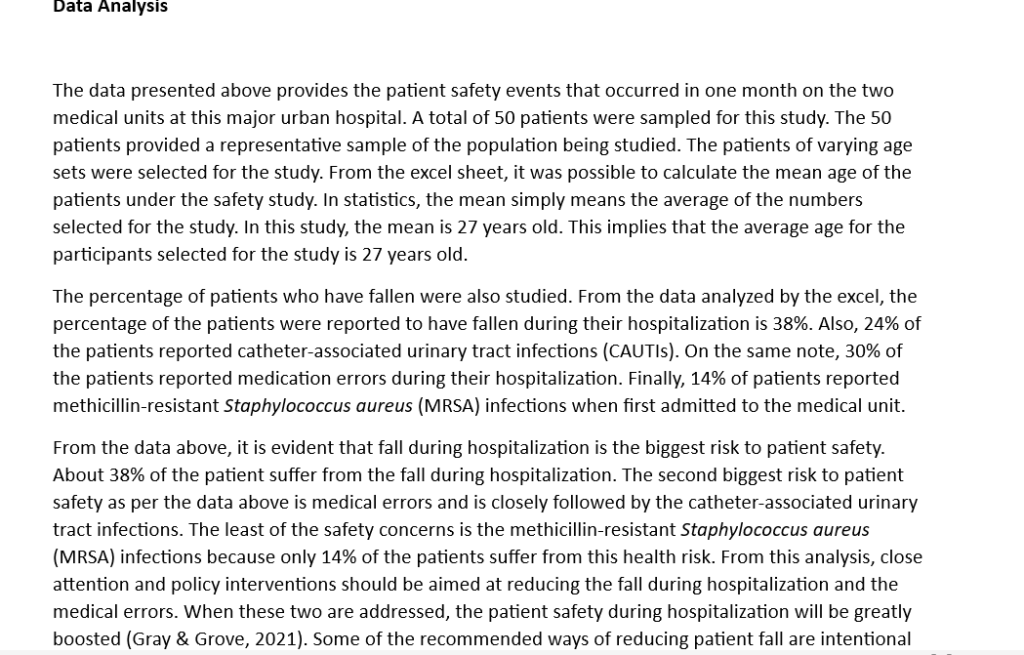
The data presented above provides the patient safety events that occurred in one month on the two medical units at this major urban hospital. A total of 50 patients were sampled for this study. The 50 patients provided a representative sample of the population being studied. The patients of varying age sets were selected for the study. From the excel sheet, it was possible to calculate the mean age of the patients under the safety study.…..Click below to access the full sample solution (PDF)